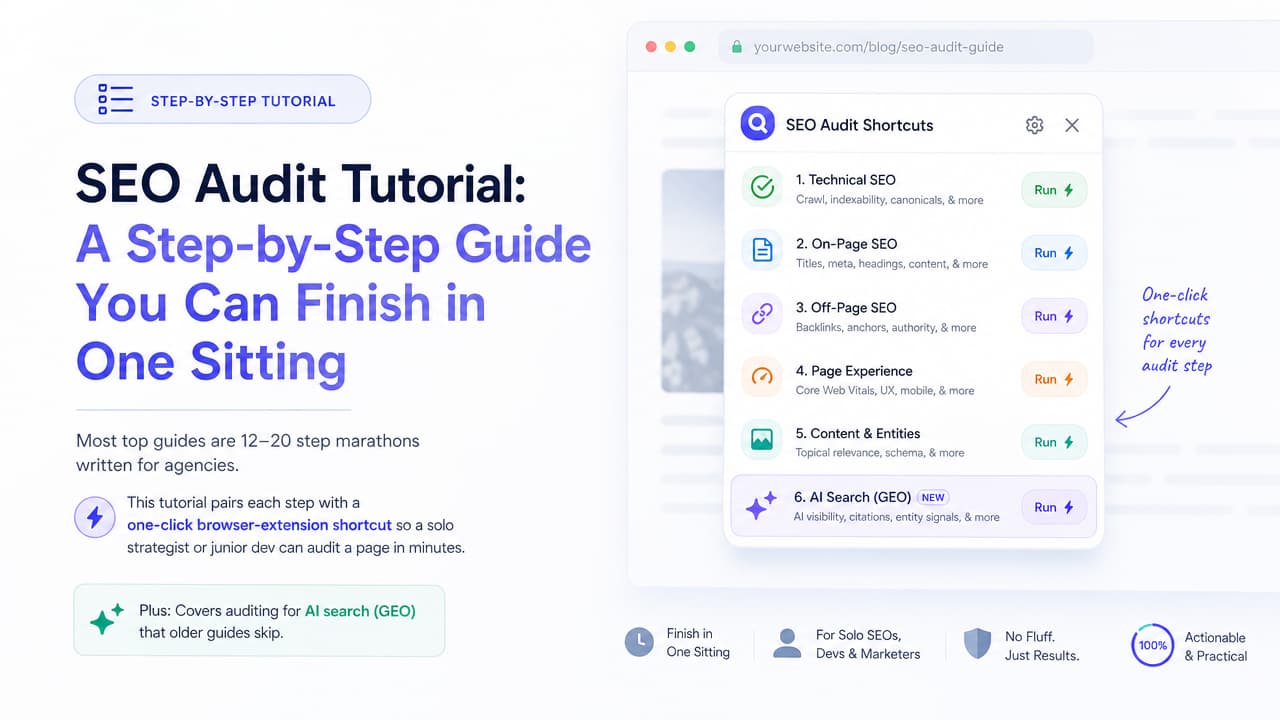
This SEO audit tutorial gives you a repeatable workflow to review any site's technical health, on-page content, and off-page signals, then turn what you find into a prioritized fix list. You don't need an agency or a five-figure toolset. A basic single-page audit takes about 20 minutes once you know the sequence, and a full site audit can be done in an afternoon.
Here's the condensed workflow you'll follow: crawl the site, analyze organic traffic, check on-page elements, verify technical health, review backlinks, then prioritize. Below, each step pairs the traditional manual method with a faster one-click shortcut using a browser extension like Argus, so a solo strategist or junior developer can move through the checklist without drowning in dashboards.
How to do an SEO audit: the fast answer
An SEO audit is a systematic review of everything that affects how a site ranks in search. You inspect three layers: technical (can search engines crawl and render the page?), on-page (are titles, headings, and content optimized?), and off-page (do other sites link to you?).
Yes, you can absolutely run your own audit. Most guides that top this search are 12 to 20 steps long because they're written for agencies auditing client portfolios. If you own one site or work on a small team, you can compress that into a focused session. The goal isn't to check every box; it's to find the handful of fixes that will actually move rankings.
The fastest version looks like this:
- Crawl the site and confirm pages are indexed.
- Analyze organic traffic and top pages in Search Console.
- Audit on-page elements: titles, meta descriptions, headings.
- Check technical health and Core Web Vitals.
- Review content quality and internal links.
- Assess backlinks and off-page signals.
- Prioritize fixes by impact versus effort.
Keep that order in mind as you read. Everything else in this tutorial expands on those seven moves.
What an SEO audit actually checks (and the 4 types)
Practitioners usually group audits into four types. You rarely run all four at full depth in a single sitting, but knowing the categories helps you decide where to spend time.
- Technical SEO audit — Crawlability, indexing, site speed, mobile usability, HTTPS, canonical tags, and structured data. This is the plumbing.
- On-page SEO audit — Title tags, meta descriptions, heading hierarchy, keyword targeting, and image alt text on individual pages.
- Off-page / backlink audit — Referring domains, anchor text distribution, and toxic or spammy links pointing at your site.
- Content and UX audit — Thin or duplicate pages, keyword cannibalization, internal linking gaps, and content that has decayed over time.
There's also an important distinction between a site-wide audit and a single-page audit. A site-wide audit crawls every URL to catch systemic problems. A single-page audit inspects one live URL in detail, which is what you'll do most often when publishing or refreshing content. If you want a focused walkthrough of the latter, our guide on how to do an on-page SEO audit covers it step by step. This tutorial covers both, but the one-click shortcuts shine on single-page checks.
Before you start: tools and data sources you need
You can run a credible audit with free tools. Here's the essential stack, from data sources to inspectors.
| Tool | What it does | Cost |
|---|---|---|
| Google Search Console | Index coverage, queries, clicks, Core Web Vitals reports | Free |
| Google Analytics | Organic traffic, engagement, conversions by page | Free |
| PageSpeed Insights | Core Web Vitals and speed diagnostics | Free |
| Screaming Frog | Full-site crawl for technical and on-page issues | Free up to 500 URLs |
| Argus Chrome extension | One-click, page-level AI SEO insights on any live URL | Free to install |
| Semrush / Ahrefs | Backlink data, keyword research, site audits at scale | Paid |
The practical split is between heavyweight platforms and lightweight browser tools. Semrush and Ahrefs are excellent for deep, recurring, multi-site work, but they're overkill when you just want to know why one page isn't performing. For those quick checks, an on-page inspector that surfaces titles, headings, schema, and content gaps the instant you load a page saves real time. If you're weighing options, our roundup of free SEO audit tools breaks down what each one actually checks. That's the niche Argus fills: open the page, click the icon, read the insights.
Use the free stack to start. Add a paid platform only when your backlink or keyword needs outgrow what Search Console gives you.
Step-by-step SEO audit walkthrough
This is the core of the tutorial. Each step lists the manual method and the fast one-click shortcut. Work through them in order the first time, then cherry-pick on future audits.
Step 1: Crawl the site and confirm indexing
Manual method: Run Screaming Frog against your domain to pull every URL, status code, title, and meta tag. Then open the Pages report in Google Search Console to see which URLs are indexed and which are excluded. Check three things specifically:
- Your robots.txt file isn't blocking important pages (visit yoursite.com/robots.txt).
- Your XML sitemap exists, is submitted in Search Console, and lists your canonical URLs.
- No key pages carry an accidental noindex tag, and there are no orphan pages (pages with no internal links pointing to them).
Flag any crawl errors, redirect chains, and 404s for your fix list.
One-click shortcut: For a single page, load it and check its indexability in seconds with a browser extension instead of waiting on a crawl. Argus reads the page's meta robots directives and canonical tag on the spot, so you know immediately whether a URL is telling Google to stay away.
Step 2: Audit on-page elements (titles, meta, headings)
Manual method: For each important page, inspect the title tag, meta description, and heading structure. Ask:
- Is there exactly one H1, and does it describe the page clearly?
- Do the meta titles include the target keyword and stay under roughly 60 characters?
- Are meta descriptions written to earn clicks, not left blank or duplicated?
- Do headings (H2, H3) form a logical outline rather than being used for styling?
- Does every meaningful image have descriptive alt text?
Doing this by viewing source on every page is slow and error-prone. If you want a deeper reference, our complete list of on-page SEO tags explains each element with examples.
One-click shortcut: An on-page inspector surfaces all of this instantly on any live page. Argus lays out the title, description, heading hierarchy, and image alt coverage the moment you open the page, and its AI flags where the copy is off-target or missing. That turns a tedious view-source hunt into a glance.
Step 3: Check technical health and Core Web Vitals
Manual method: Technical issues quietly cap your ceiling. Verify:
- Core Web Vitals — Run the page through PageSpeed Insights and note Largest Contentful Paint, Interaction to Next Paint, and Cumulative Layout Shift.
- Mobile-friendliness — Confirm the page renders and taps correctly on a phone.
- HTTPS — The whole site should be secure, with no mixed-content warnings.
- Canonical tags — Each page should point to its preferred URL to avoid duplicate-content confusion.
- Structured data — Check that schema markup (Article, Product, FAQ, etc.) is present and valid.
One-click shortcut: Argus detects the structured data on a page and shows what schema types are present, so you don't have to paste URLs into a separate validator to see whether markup is even there. Pair that with PageSpeed Insights for the vitals numbers and you've covered the technical layer fast.
Step 4: Analyze content quality and internal links
Manual method: This is where the biggest wins usually hide. Look for:
- Thin or duplicate content — Pages with little unique value or near-identical copy to other URLs.
- Keyword cannibalization — Two or more pages competing for the same query, splitting your authority.
- Internal linking gaps — Important pages that few other pages link to, or link with weak anchor text.
- Content decay — Older posts that once ranked and have since slipped in traffic; these often just need a refresh.
This is the right place to apply the 80/20 rule. Roughly 20% of your fixes will drive about 80% of the results. Refreshing one high-potential page that's stuck on page two usually beats making tiny tweaks across fifty pages that nobody visits.
One-click shortcut: Argus reads the page's content and returns AI insights on whether it comprehensively covers the topic, where it's thin, and what related subtopics are missing. That gives you a content-gap read on a single page without exporting spreadsheets.
Step 5: Review backlinks and off-page signals
Manual method: Off-page signals still carry weight. Backlink analysis is the one area where free tools are genuinely limited, so this is where a paid platform earns its keep. Check:
- Referring domains — How many unique sites link to you, and are they reputable?
- Toxic links — Spammy or irrelevant domains that could drag you down.
- Anchor text distribution — A natural mix of branded, exact-match, and generic anchors, not an over-optimized pattern.
Ahrefs and Semrush are the go-to tools for backlink data. If you're on a free plan, Search Console's Links report gives you a basic view of who links to you. For a broader view of what matters beyond links, see our rundown of off-page SEO ranking factors.
One-click shortcut: There's no true shortcut for full backlink data, so budget for a paid tool if links are your bottleneck. For everything on the page itself, though, your extension already did the heavy lifting in Steps 1 through 4.
Auditing for AI search and GEO
Here's what most audit guides written before this year skip entirely. Search results now frequently include an AI Overview, and answer engines like ChatGPT, Perplexity, and Google's AI mode pull answers directly from web content. Optimizing to be cited by those systems is called Generative Engine Optimization, or GEO, and it changes what your audit needs to look for.
Traditional on-page checks still matter, but add these AI-readiness questions:
- Clear factual answers — Does the page answer likely questions directly and early, in language a model can lift verbatim?
- Structured content — Are you using descriptive headings, lists, and tables that machines can parse into discrete facts?
- Entity clarity — Are the people, products, and concepts on the page named explicitly and consistently, so the engine understands what you're about?
- Citations and sources — Does the content signal trustworthiness with references, data, and author context?
This is exactly where AI-powered tools earn their place. A conventional crawler can tell you a title is too long; it can't tell you whether your content is likely to be quoted in an AI Overview. If you're building a stack for this, our list of the best free AI SEO tools compares options by task. Argus was built for this shift. Its AI-powered insights evaluate a page against both traditional SEO and AI-search criteria in one pass, so you catch GEO gaps in the same 20-minute session instead of learning about them a year late.
Can AI and ChatGPT run an SEO audit for you?
This comes up in People Also Ask constantly, so let's be precise about what AI can and can't do.
What ChatGPT can do: Paste in your page copy or HTML and it will happily critique your titles, suggest better meta descriptions, spot readability problems, and recommend content additions. It's a capable writing and analysis partner.
What ChatGPT can't do: It can't crawl your live site, read your real Core Web Vitals, pull your actual index coverage, or fetch ranking and backlink data. It doesn't see the rendered page, your Search Console numbers, or your competitors' positions. If you ask it for an "audit" without feeding it data, you get generic advice, not a diagnosis of your page.
That gap is the reason purpose-built AI extensions exist. Argus runs on the live page you're viewing, so it combines real page context, actual on-page elements, and detected structured data with AI analysis, then delivers a one-click SEO audit that's specific to that URL. It's the difference between asking a smart friend for tips and having an inspector examine the actual building.
Prioritizing fixes: turning your audit into an action plan
An audit that ends in a 200-line spreadsheet nobody acts on is wasted work. The output you want is a clear, prioritized fix list, not jargon. Sort every finding along two axes: impact and effort.
| Priority | Impact | Effort | Examples |
|---|---|---|---|
| Do first | High | Low | Fix a noindex on a key page, add a missing title, refresh a decaying post |
| Schedule | High | High | Rebuild internal linking, resolve cannibalization, improve Core Web Vitals |
| Fill in | Low | Low | Add alt text, tidy meta descriptions |
| Skip for now | Low | High | Cosmetic changes with no ranking upside |
Start in the top-left quadrant: high impact, low effort. Those are your quick wins and they build momentum. Assign owners and deadlines to the high-impact, high-effort items so they don't stall. For a framework that sequences on-page work by impact rather than a flat list, see our on-page SEO strategy guide.
Finally, treat auditing as a habit, not a one-off. Track your changes, note the date you shipped each fix, and re-audit quarterly. Search engines and AI answer engines both evolve, and content decays whether you watch it or not. A quick monthly single-page check with a Chrome SEO extension keeps small problems from becoming big ones between full audits.
Free SEO audit checklist and templates
Here's a copyable recap you can reuse for any page or site. Save it, adapt it, and run it every quarter.
Technical
- Site crawls cleanly with no critical errors or broken redirects
- robots.txt allows important pages; XML sitemap submitted and current
- No accidental noindex tags on pages you want ranked
- HTTPS everywhere with no mixed-content warnings
- Canonical tags point to preferred URLs
- Core Web Vitals pass in PageSpeed Insights
- Mobile-friendly rendering confirmed
- Valid structured data present where relevant
On-page
- One clear H1 per page
- Unique, keyword-aligned title under ~60 characters
- Compelling, non-duplicated meta description
- Logical H2/H3 heading hierarchy
- Descriptive alt text on meaningful images
Content and internal links
- No thin or duplicate pages
- No keyword cannibalization between URLs
- Important pages have strong internal links and anchors
- Decaying content identified and scheduled for refresh
Off-page
- Referring domains reviewed for quality
- Toxic links identified
- Anchor text distribution looks natural
AI search / GEO
- Questions answered directly and early on the page
- Content structured with lists, tables, and clear headings
- Entities named clearly and consistently
- Sources, data, and author context present
Want to skip the manual passes? Install the Argus Chrome extension and run most of this checklist on any live page with a single click. Argus, the all-seeing SEO inspector, pairs traditional on-page checks with AI-powered insights for AI search, so you finish your first audit in one sitting and keep them fast forever after.
Frequently asked questions
Can I do my own SEO audit?
Yes. With free tools like Google Search Console, PageSpeed Insights, and a browser-based inspector, a solo strategist or junior developer can audit a page in about 20 minutes. You only need a paid platform when your backlink or large-scale keyword needs outgrow the free stack.
How long does an SEO audit take?
A focused single-page audit takes roughly 20 minutes with the right tool. A full site-wide audit of a small site can take an afternoon; larger sites take longer because of the crawl and backlink analysis. One-click extensions cut the on-page portion dramatically.
Can ChatGPT do an SEO audit?
Partly. ChatGPT can analyze content you paste in and suggest improvements to titles, descriptions, and copy. It cannot crawl your live site or access ranking, index, or backlink data on its own. Purpose-built AI extensions like Argus bridge that gap by analyzing the actual live page in one click.
What is the 80/20 rule in SEO?
It's the principle that about 20% of your fixes drive roughly 80% of your results. In an audit, that means prioritizing high-impact changes, like refreshing a page stuck on page two, over dozens of minor tweaks to pages with little traffic potential.
What is the best free tool for an SEO audit?
Google Search Console is the essential free data source, paired with PageSpeed Insights for Core Web Vitals and Screaming Frog for crawling. For fast on-page checks, a free Chrome extension like Argus surfaces titles, headings, schema, and AI-search readiness on any live page in one click.

