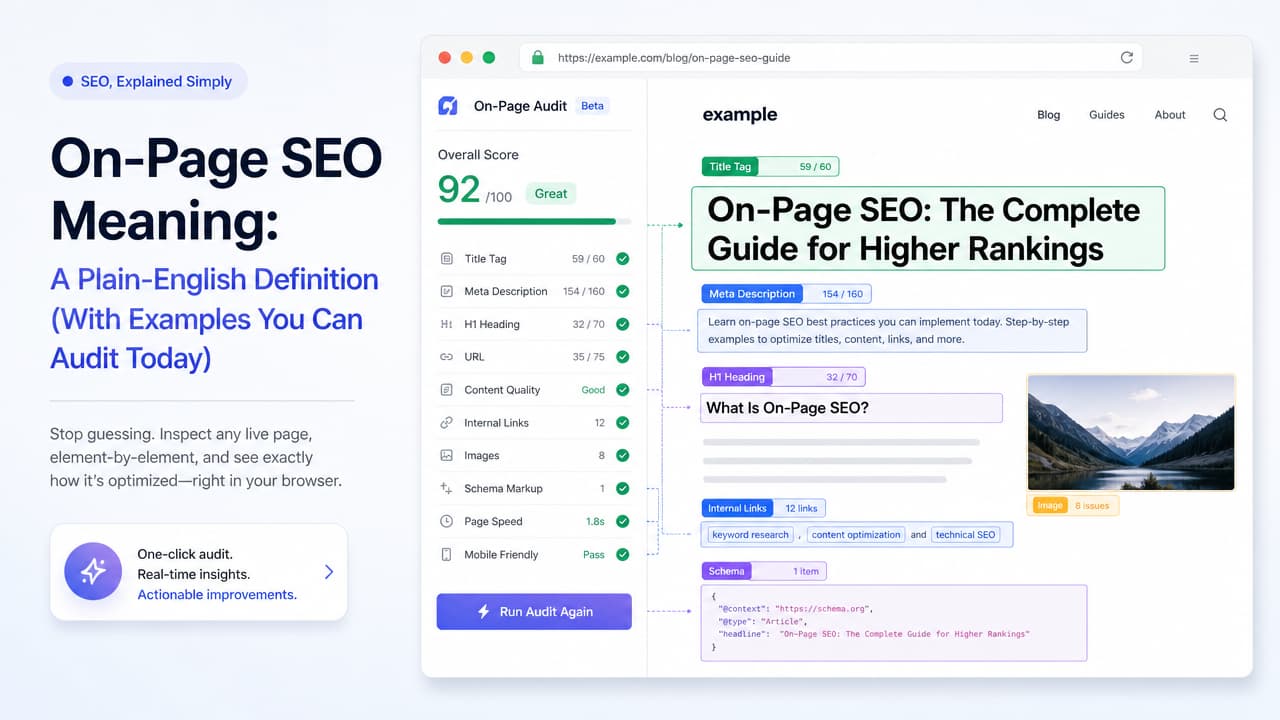
On-page SEO meaning, in plain English: on-page SEO is the practice of optimizing an individual web page's content, HTML source code, and structure so both search engines and people can understand it, trust it, and rank it. It covers everything you directly control on the page itself — the words, the tags, the headings, the links, and the experience.
That definition lines up with the industry consensus. Moz frames it as "optimizing content and HTML source code." Semrush describes it as "tasks performed internally" on your pages. Workshop Digital calls it optimizing the "content, structure, and experience" of individual pages. Different phrasing, same idea: on-page SEO is the part of search optimization that happens on your side of the page.
What On-Page SEO Means (Definition First)
On-page SEO — also called on-site SEO or on-page optimization — is the process of shaping a page so it clearly signals what it's about and serves the person reading it. It works on two fronts at once.
- For search engines: clean HTML, descriptive title tags, logical heading structure, and structured data help crawlers parse and categorize the page accurately.
- For users: relevant content that matches intent, scannable formatting, fast load times, and helpful internal links keep visitors engaged and satisfied.
The key distinction is control. With on-page optimization, every factor lives inside the page's own markup and copy. You don't have to wait on anyone else — you can inspect it, diagnose it, and fix it today.
On-Page vs Off-Page vs Technical SEO
A common follow-up is the difference between on-page and off-page SEO, plus where technical SEO fits. People often ask about the "four types of SEO" — usually meaning on-page, off-page, technical, and local. Here's the clean breakdown of the three foundational categories.
| Type | What it covers | Who controls it | Examples |
|---|---|---|---|
| On-page SEO | Content and HTML on the page itself | You, fully | Title tags, headings, copy, internal links, alt text |
| Off-page SEO | External signals pointing to your site | Partly — earned, not set | Backlinks, brand mentions, reputation |
| Technical SEO | Site infrastructure and crawlability | You, with dev support | Site speed, indexing, XML sitemaps, mobile rendering |
On-page and technical SEO overlap. Structured data, page speed, and mobile-friendliness sit on the border — they live in the page's code but affect the whole site's infrastructure. A useful rule of thumb:
- On-page = what's on the page you write and mark up.
- Off-page = external signals you earn from other sites.
- Technical = the infrastructure that lets search engines reach and render your pages.
Local SEO, the fourth type people cite, is really a specialization that combines all three for geographic queries (think Google Business Profile and location pages).
The Core On-Page SEO Factors (With Examples)
These are the auditable elements that make up on-page SEO. Each one is something you can look at on a live page and improve directly. Here are the on-page SEO factors that matter most, with examples.
Title tags
The clickable headline in search results and the strongest single on-page signal of topic. Keep it descriptive, front-load the main keyword, and stay under roughly 60 characters so it doesn't truncate. Example: On-Page SEO Meaning: Definition, Factors & How to Audit.
Meta descriptions
The summary snippet under the title. It doesn't directly rank a page, but a compelling meta description improves click-through. Write it like ad copy: state the value and include the target term naturally. If you want the full rundown, our guide to on-page SEO tags with examples covers each one in detail.
Header tags (H1–H6) and hierarchy
One H1 per page states the main topic. H2s and H3s break the content into logical sections. A clean hierarchy helps both readers scan and search engines understand structure. Skipping from H1 straight to H4, or stacking multiple H1s, muddies the signal.
URL structure
Short, readable URLs with keywords beat long strings of parameters. Compare /blog/on-page-seo-meaning to /blog/post?id=48213. The first tells a person and a crawler what to expect.
Keyword placement and search intent
Place your target term in the title, H1, first paragraph, and naturally throughout — but only after confirming the page matches search intent. Our breakdown of where on-page SEO keywords belong walks through all eight placements. A definition query wants an answer-first explanation, not a product pitch.
Content quality and depth
Cover the topic thoroughly enough to satisfy the query without padding. Depth means answering the obvious follow-up questions on the same page, which is exactly why sections like this one exist.
Internal linking
Links between your own pages spread authority and help users (and crawlers) discover related content. Use descriptive anchor text — "on-page SEO checklist" beats "click here."
Image alt text
Alt attributes describe images for screen readers and search engines. Beyond accessibility, they give context to visual content and can surface in image search.
Structured data (schema)
Schema markup tells search engines exactly what a page's elements represent — an article, an FAQ, a product, a review. It can unlock rich results and improve how AI systems interpret your content.
Page experience signals
Load speed, mobile responsiveness, and layout stability affect both rankings and satisfaction. A page that answers the query but takes eight seconds to load still loses visitors.
How to Do On-Page SEO: A Step-by-Step Audit Workflow
Knowing the factors is one thing; checking them on a real page is another. Treat on-page SEO as a repeatable per-page audit rather than guesswork. For a deeper walkthrough, see our step-by-step on-page SEO audit checklist. Here's a workflow you can run on any URL.
- Confirm search intent and target keyword. Search your term and study what already ranks. Is the intent informational, commercial, or transactional? Your page has to match before anything else counts.
- Inspect the title, meta description, and H1. Do they contain the target term? Do they read like something a person would click? Is there exactly one H1?
- Check heading hierarchy and content coverage. Walk the H2/H3 outline. Does it flow logically and cover the subtopics users expect? Fill gaps competitors already address.
- Review URL, internal links, and images. Is the URL clean? Are there relevant internal links with descriptive anchors? Do images have alt text?
- Validate schema and page speed. Confirm structured data is present and valid, and check that the page loads quickly on mobile.
The faster you can inspect these elements directly — instead of copying source code into a spreadsheet — the more pages you can audit in a sitting.
Inspecting On-Page SEO Element-by-Element in Your Browser
Here's where an on-page SEO checklist becomes an instant diagnosis. Most on-page factors are visible in a page's own markup, which means you don't need a full crawl to see a page's health. You just need to inspect what's already loaded in your browser, which is exactly how you can check and fix a page in one click.
That's the idea behind Argus by Pixelesq, a Chrome extension built as an all-seeing SEO inspector. Instead of setting up a crawl or opening a dashboard, you run a one-click audit on whatever page you're viewing and Argus surfaces the on-page elements in real time:
- Title tag and meta description, exactly as search engines read them
- Heading structure and hierarchy, so you can spot missing or duplicated H1s at a glance
- Image alt text, canonical tags, and structured data
- AI-powered insights that flag issues and suggest fixes as you browse
Compare that to heavier suites that require project setup, crawl scheduling, and a login before you see a single insight. Those tools are powerful for site-wide work, but they're slow for a quick, page-level answer. For a content strategist checking a draft before it publishes, or a marketing executive spot-checking a landing page, a browser-based inspection turns the abstract theory of on-page SEO into a live diagnosis in seconds.
This is the practical payoff of the on-page SEO meaning we started with: because everything is on the page, everything is inspectable. A one-click SEO audit just makes that inspection instant.
On-Page SEO Tools and Cost Considerations
"Which tool is best for on-page SEO?" depends on your workflow. Tools fall into a few categories, each with different strengths and price points. Our comparison of the best tools for on-page SEO breaks them down by task.
| Tool category | Best for | Typical cost |
|---|---|---|
| Browser extensions (Argus, MozBar) | Fast per-page inspection while you browse | Free to low-cost |
| Crawlers (Screaming Frog) | Site-wide technical and on-page audits | Free tier, then annual license |
| All-in-one suites (Semrush, Ahrefs, Moz) | Keywords, backlinks, tracking, reporting | Paid monthly subscriptions |
| CMS plugins (Yoast) | On-page guidance inside your editor | Free core, paid premium |
On cost, on-page SEO itself ranges widely. Doing it yourself with free extensions and plugins costs mainly your time. Paid suites run as recurring subscriptions. Hiring an agency or specialist adds professional fees that scale with scope. The honest answer: match the tool to your workflow and budget. If you mostly need to check individual pages quickly, a lightweight extension like Argus — or one of the other best Chrome SEO extensions — covers the on-page essentials without a subscription commitment. If you're managing hundreds of URLs and backlink campaigns, a full suite earns its cost.
On-Page SEO in Digital Marketing: Why It Matters
In digital marketing, on-page SEO is the foundation you control completely. You can't force other sites to link to you, and you can't rewrite Google's crawler — but you can shape every page you publish.
That control compounds. Well-optimized pages earn organic traffic that keeps arriving without ongoing ad spend, which is why on-page work tends to improve marketing ROI over time. Following a set of best on-page SEO practices keeps that momentum consistent. It's also the base layer that off-page and technical efforts build on: backlinks pointing to a thin, poorly structured page waste their value.
On-page SEO now matters for AI search visibility too. Search results increasingly include AI Overviews that pull from and summarize page content. The same clear structure, accurate headings, and structured data that help traditional rankings also help AI systems understand and cite your page. Clean on-page optimization serves both audiences at once.
The takeaway: on-page SEO isn't a one-time checklist item. It's a diagnosable state of every page you own — one you can inspect, improve, and re-check whenever you want. Add Argus by Pixelesq to Chrome and run a one-click audit on your next page to see its on-page health for yourself.
Frequently Asked Questions
What is the difference between on-page and off-page SEO?
On-page SEO covers optimizations on the page itself — content, title tags, headings, internal links, and HTML. Off-page SEO covers external signals you earn from other sites, mainly backlinks and brand mentions. You control on-page fully; off-page you influence but don't own.
What are the four types of SEO?
The four commonly cited types are on-page SEO, off-page SEO, technical SEO, and local SEO. On-page handles page content and markup, off-page handles external authority, technical handles site infrastructure and crawlability, and local focuses on geographic and map-based visibility.
How much does on-page SEO cost?
It varies. Doing it yourself with free extensions and CMS plugins costs mostly your time. Paid all-in-one suites charge monthly subscriptions. Hiring an agency or freelancer adds professional fees that scale with the size and scope of your site.
Which tool is best for on-page SEO?
The best tool depends on your workflow. For fast per-page checks while browsing, a Chrome extension like Argus is ideal. For site-wide crawls, Screaming Frog works well. For keyword and reporting depth, suites like Semrush, Ahrefs, or Moz fit, and Yoast helps inside WordPress editing.
Can I check a page's on-page SEO without paid software?
Yes. Free browser extensions let you inspect title tags, meta descriptions, heading structure, alt text, and structured data on any live page in one click. Argus by Pixelesq surfaces these elements plus AI-powered insights without requiring a paid dashboard or crawl setup.

