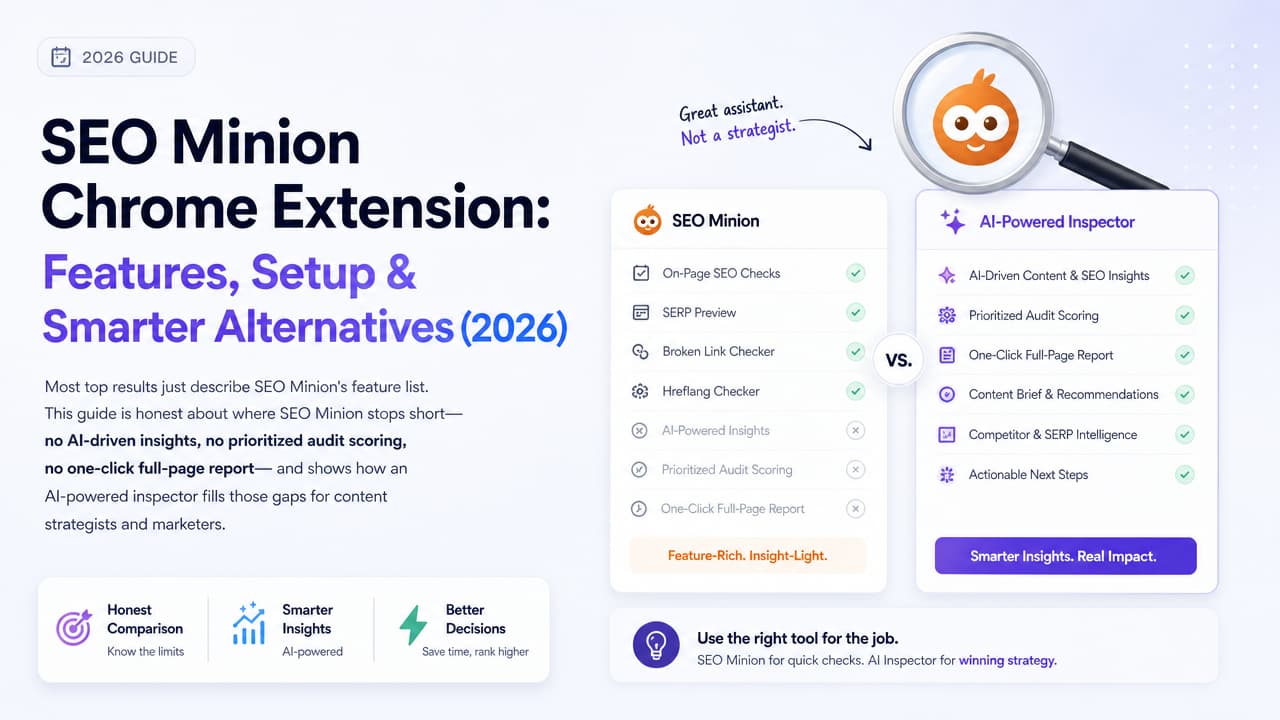
The SEO Minion extension for Chrome is a free browser tool that handles routine SEO tasks—on-page analysis, broken link checking, hreflang validation, SERP previews, and People Also Ask (PAA) exports. It's genuinely useful for spot checks. But it stops at raw data: there's no AI interpretation, no prioritized fix list, and no one-click full-page audit. This guide covers what SEO Minion does well, how to install it, exactly where it falls short, and which smarter, AI-powered alternatives fill those gaps for content strategists and marketers.
What SEO Minion Is and What It Does
SEO Minion is a free Chrome and Firefox extension, now maintained by Keywords Everywhere. It bills itself as a “digital sidekick” for daily SEO work—the Alfred to your Batman, as its own marketing puts it. The idea is simple: instead of switching between separate web apps for small checks, you run them right in your browser on the page you're viewing.
Its core feature set covers the tasks most SEOs repeat all day:
- On-Page SEO analysis — inspect meta tags, headings, and links on any page.
- Broken Link Checking — highlight dead links across a page.
- Hreflang tag checking — verify international targeting tags.
- SERP Preview — see how a title and description will render in search results.
- Multi-country and multi-language SERP simulation — check how rankings look from different locations.
- People Also Ask (PAA) downloading — export related questions for content research.
It's free, browser-based, and built for manual, task-by-task use. You point it at a page or a search result and it returns the data for that one check.
How to Install SEO Minion on Chrome
Adding the SEO Minion extension for Chrome takes under a minute:
- Open the Chrome Web Store and search for SEO Minion, or go directly to chromewebstore.google.com/detail/seo-minion.
- Click Add to Chrome, then confirm with Add extension in the popup.
- Once installed, click the puzzle-piece Extensions icon in your toolbar and pin SEO Minion so it's always one click away.
- Click the SEO Minion icon on any page or search result to open its menu of tools.
How do I find my extensions on Google Chrome?
Click the puzzle-piece icon at the top-right of the Chrome toolbar to see every installed extension, or type chrome://extensions in the address bar for the full management page. From there you can pin, disable, or remove any extension—including SEO Minion.
Using SEO Minion on Firefox
SEO Minion isn't Chrome-only. A Firefox add-on is available on addons.mozilla.org—search for “SEO Minion” and click Add to Firefox. The feature set mirrors the Chrome version, so multi-browser teams can standardize on it.
SEO Minion's Key Features in Practice
Here's how each function plays out in real day-to-day work.
On-Page SEO analysis
Open a page and SEO Minion surfaces the title tag, meta description, heading hierarchy, and link structure. You can quickly confirm whether an H1 exists, spot duplicate headings, or see how many internal versus external links a page carries. It's handy for a fast sanity check before publishing, and if you want a fuller picture there's a one-click audit checklist worth working through.
Broken Link Checker
Run the broken link check and SEO Minion highlights dead links directly on the page, marking working and broken URLs. That's useful when auditing an old blog post or a resource page where links rot over time.
SERP Preview
The SERP preview shows how a page's title and description will appear in Google's results. Because search engines truncate long titles and descriptions, this helps you tighten copy so nothing important gets cut off before a searcher ever clicks. It's one of the core on-page SEO tags worth verifying on every page.
Hreflang checker
For international sites, the hreflang checker validates language and region tags so the right version of a page serves the right audience. Misconfigured hreflang is a common and hard-to-spot problem, so a quick visual check has real value.
Multi-country and language SERP simulation
You can simulate search results from different countries and languages without VPNs or manual query parameters. That's especially useful for verifying local rankings or checking how a page competes in a specific market.
Every one of these is a manual, one-at-a-time action. You choose a tool, run it, read the output, and move on to the next. That design is intentional—but it's also where the limitations start.
Where SEO Minion Falls Short
Most articles about SEO Minion simply recite the feature list. Here's the honest part they skip: SEO Minion gives you data, not decisions.
- No AI interpretation. It reports what's on the page, but it won't tell you whether your meta description is actually weak or your heading structure is hurting you. You interpret every result yourself.
- No prioritized fix list. There's no ranking of what to fix first. A missing H1 and a slightly long title look equally “flagged”—you decide what matters.
- No unified audit score. You never get a single health number to track a page over time or compare against competitors.
- No one-click full-page report. Want on-page, links, and SERP data together? You run each check separately and stitch the picture together in your head.
For a technical SEO who already knows what every data point means, that's fine. For a content strategist, marketing executive, or junior developer who wants to know what to do next, it's a lot of manual interpretation. That gap is exactly why AI-powered inspectors exist, and why a proper on-page SEO audit beats a scattershot list of flags.
SEO Minion vs. AI-Powered SEO Inspectors
The difference isn't which tool has more buttons—it's whether the tool hands you raw data or an actual answer. SEO Minion is a manual toolbox. An AI-powered inspector like Argus by Pixelesq runs a one-click audit and returns prioritized, plain-English SEO insights for the whole page at once.
| Capability | SEO Minion | Argus by Pixelesq |
|---|---|---|
| On-page checks | Yes, manual per task | Yes, in one click |
| AI-driven interpretation | No | Yes |
| Prioritized fix list | No | Yes |
| Unified audit score | No | Yes |
| One-click full-page report | No | Yes |
| Broken link / hreflang checks | Yes | Covered in audit |
| Best for | Quick manual spot checks | Strategists & marketers who want insight, not data dumps |
The practical takeaway: if you already know how to read SEO data and just want a fast way to pull it, SEO Minion is a solid free choice. If you want the tool to interpret the page, tell you what's wrong, and rank fixes by impact, an AI-powered inspector does the thinking SEO Minion leaves to you.
Argus is built around that one gap. Point it at any page and it returns an all-seeing audit—hence “The All-Seeing SEO Inspector”—in a single click, so a marketer without a technical SEO background still walks away knowing exactly what to change.
Best Free SEO Minion Alternatives for Chrome
If you're hunting for a SEO Minion free alternative or comparing it to the Detailed SEO Extension, here's an honest snapshot of the main free options and what each is best at. For a wider view, our roundup of the best Chrome SEO extensions compares them by use case.
- Detailed SEO Extension — A clean, popular free extension for reading on-page elements: titles, meta tags, headings, canonicals, and structured data. Great for fast technical inspection; no AI interpretation.
- MozBar — Surfaces Moz's Domain Authority and Page Authority metrics on any page and in search results. Best when you care about authority signals and link metrics.
- Ahrefs SEO Toolbar — Adds Ahrefs' backlink and traffic data, plus on-page and redirect checks, directly in the browser. Strong for backlink and competitive research (full data needs an Ahrefs account).
- SEOquake — A long-standing free toolbar packing keyword density, page audits, and SERP overlays into one panel. Data-rich but dense to read.
- Argus by Pixelesq — The AI-first option: a one-click SEO audit that turns page data into prioritized, plain-English insights and a clear score. Best when you want interpretation and next steps, not another spreadsheet.
SEO Minion, Detailed, MozBar, Ahrefs Toolbar, and SEOquake all lean on you to read and act on the numbers. Argus is the one designed to hand you the conclusions. If cost is the deciding factor, see which free SEO audit tools actually check what.
Which SEO Chrome Extension Should You Choose?
The right pick depends on your goal, not on which extension has the longest feature list.
- You want quick, manual checks and you already speak SEO. Use SEO Minion or the Detailed SEO Extension. Both are free, fast, and perfect for confirming meta tags, headings, and broken links before you publish.
- You care most about backlinks and domain authority. Reach for the Ahrefs SEO Toolbar or MozBar, which put link and authority metrics front and center.
- You're a content strategist, marketer, or developer who wants an audit that explains itself. Choose an AI-powered inspector like Argus by Pixelesq. A one-click audit gives you a website SEO score and a prioritized, plain-English list of what to fix—so insight becomes action without the manual interpretation.
A smart workflow uses both types together: run Argus for the full-page, AI-driven audit and priorities, then use a manual tool like SEO Minion for a targeted double-check on a specific link or hreflang tag. You get the interpretation and the granular verification. If you're building a repeatable process, this step-by-step audit tutorial ties it all together.
Ready to see the difference between raw data and real insight? Add Argus by Pixelesq to Chrome and run your first one-click SEO audit.
Frequently Asked Questions
Is the SEO Minion extension free?
Yes. SEO Minion is a free Chrome and Firefox extension, now maintained by Keywords Everywhere. Its core tools—on-page analysis, broken link checking, hreflang checking, SERP preview, and PAA downloading—are available at no cost.
What is the best SEO extension for Chrome?
It depends on your goal. SEO Minion and the Detailed SEO Extension are best for quick manual checks, Ahrefs and MozBar for authority and backlink metrics, and Argus by Pixelesq for AI-powered, one-click audits that prioritize fixes in plain English.
Is SEO Minion available for browsers other than Chrome?
Yes. Alongside the Chrome Web Store version, SEO Minion offers a Firefox add-on on addons.mozilla.org with the same core features.
What's a good AI-powered alternative to SEO Minion?
Argus by Pixelesq is an AI-powered alternative built for the gaps SEO Minion leaves open. Instead of running each check manually, you get a one-click full-page audit with a unified score and a prioritized, plain-English list of what to improve.
How do I find installed extensions in Google Chrome?
Click the puzzle-piece Extensions icon at the top-right of Chrome, or type chrome://extensions in the address bar. From there you can pin, disable, or remove any extension, including SEO Minion.

