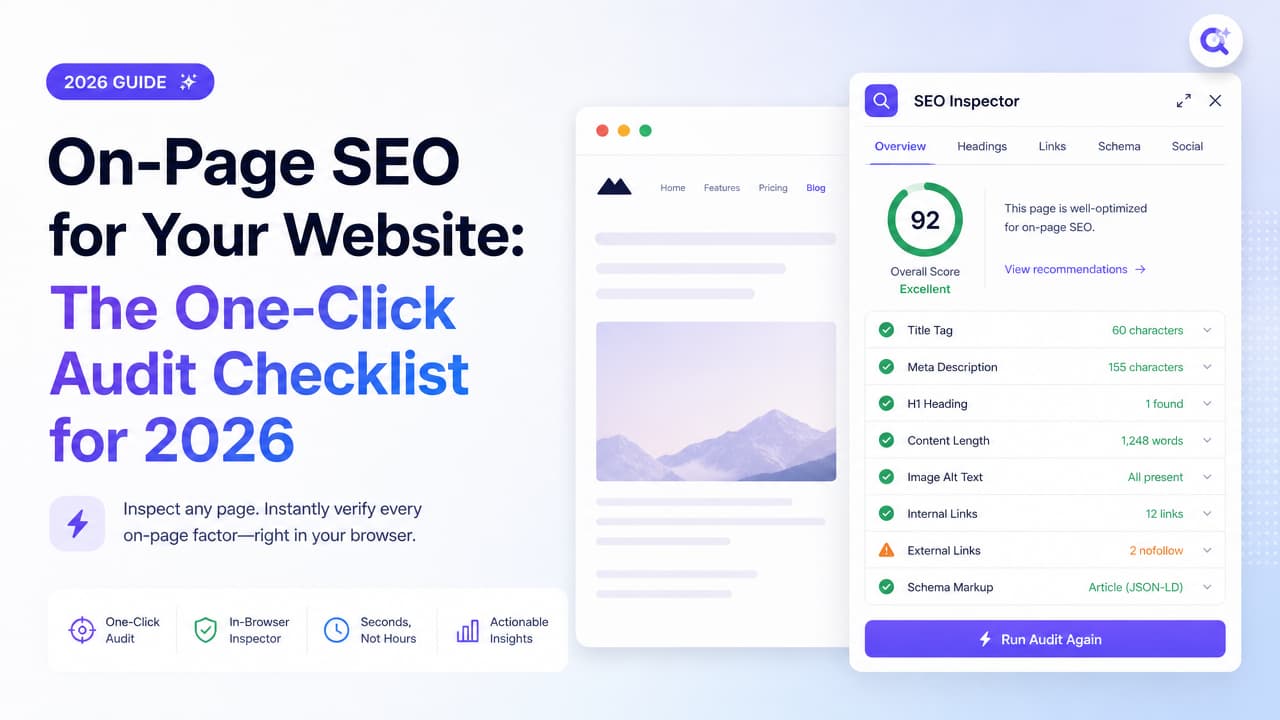
On-page SEO is the practice of optimizing an individual web page's content and HTML source code so it ranks higher and earns more relevant organic traffic. When people talk about the on page SEO website work that actually moves rankings, they mean the parts you control directly on the page itself: title tags, headings, copy, links, images, and structured data.
Most guides drown you in theory and never show you how to check any of it on a live page. This one pairs every factor with a way to verify it in seconds, right in your browser, instead of juggling five separate tools.
What Is On-Page SEO (and What It Isn't)
On-page SEO (also called on-site SEO) is the process of optimizing the content and HTML of a single page to improve its search visibility and relevance. It covers everything a search engine reads when it crawls your URL and everything a human sees when they land there.
It helps to separate three overlapping ideas:
- On-page SEO — what's on the page: titles, meta descriptions, headings, body content, internal links, image alt text, and schema. You fully control this.
- Off-page SEO — signals earned elsewhere: backlinks, brand mentions, and reputation. You influence it but don't own the pages.
- Technical SEO — how the site is built and served: crawlability, indexation, site architecture, and performance. It overlaps with on-page on things like page speed and canonical tags.
So when someone asks "what is an on-page in SEO?", the short answer is: any optimization applied directly to the page to help it rank and read well. If you want a fuller breakdown, our plain-English definition of on-page SEO walks through it with examples. Off-page happens away from your site. On-page is the one area where you have complete, immediate control, which is exactly why it's the fastest place to win.
The On-Page SEO Checklist: 12 Factors That Actually Move Rankings
Below are the on-page SEO factors worth auditing on every important page. Each one comes with what to check and how to verify it instantly in-browser, so you're inspecting reality instead of guessing from a content brief. For a task-by-task version, see our complete on-page SEO activities checklist.
1. Title tag
Check: One unique, descriptive title around 50–60 characters that includes the primary keyword near the front.
Verify in-browser: Open an SEO inspector and read the rendered title tag directly, rather than trusting the H1 or the browser tab.
2. Meta description
Check: A compelling 140–160 character summary that earns the click. It's not a ranking factor, but it drives click-through.
Verify in-browser: Surface the live meta description and confirm it isn't missing, truncated, or duplicated across pages. A quick primer on on-page SEO tags shows exactly what to look for.
3. H1 and heading hierarchy
Check: Exactly one H1 that states the page topic, then a logical H2/H3 structure. No skipped levels, no headings used for styling.
Verify in-browser: Pull the full heading outline in one view to spot a missing H1 or five competing H2s in seconds.
4. URL structure
Check: Short, readable, keyword-relevant slugs. Avoid dates, IDs, and parameter soup where you can.
Verify in-browser: Read the canonical URL and confirm the slug matches the topic, not an auto-generated string.
5. Keyword placement and search intent
Check: The primary keyword appears in the title, H1, first 100 words, and naturally throughout. More importantly, the content matches the intent behind the query.
Verify in-browser: Scan where the keyword actually lands in the rendered headings and opening copy instead of assuming your CMS placed it well. Our guide to where on-page SEO keywords belong covers all eight spots.
6. Internal linking
Check: Relevant internal links with descriptive anchor text pointing to and from the page. Every important page should be reachable and should pass context.
Verify in-browser: List all on-page links and their anchors at a glance to catch orphaned sections and vague "click here" anchors.
7. Image alt text
Check: Meaningful alt attributes on content images, plus reasonable file sizes.
Verify in-browser: Flag every image missing alt text without inspecting each element by hand.
8. Content depth and quality
Check: The page fully answers the query, demonstrates expertise, and reads well for humans. Thin or duplicated content underperforms.
Verify in-browser: Review word count and heading coverage against the top-ranking pages you're competing with.
9. Schema markup
Check: Appropriate structured data (Article, FAQ, Product, Breadcrumb) that matches the visible content.
Verify in-browser: Detect which schema types are present on the page and whether they're firing at all.
10. Canonical tags
Check: A self-referencing canonical on primary pages, and correct canonicals on variants to prevent duplication.
Verify in-browser: Read the canonical URL directly and confirm it points where it should.
11. Page speed and Core Web Vitals
Check: Fast loading, stable layout, and quick interactivity. Speed sits between on-page and technical, and it affects both rankings and conversions.
Verify in-browser: Check performance signals alongside the rest of your audit so speed problems don't hide behind pretty content.
12. Mobile-friendliness
Check: Responsive layout, legible text, and tappable targets. Google indexes mobile-first.
Verify in-browser: Confirm the viewport is set and the page renders cleanly on smaller screens before you ship.
How to Audit a Page in Seconds Instead of Hours
Here's the differentiator most articles skip: you don't need to run a full crawl or export a report to answer "is this page optimized?" You need to inspect what's actually on the URL in front of you. If you'd rather follow a structured pass, our on-page SEO audit walkthrough shows how to check any page in under a minute.
The traditional workflow is heavy. You fire up Screaming Frog to crawl the site, wait for it to finish, then filter for missing titles. Or you log into Semrush or Ahrefs, queue a site audit, and dig through a dashboard. That's the right tool when you're auditing thousands of URLs — but it's overkill when you just want to check one live page you're editing right now.
A Chrome SEO inspector collapses that into a single click. Argus by Pixelesq — the all-seeing SEO inspector — surfaces the title, meta description, heading hierarchy, internal and external links, image alt text, canonical, and schema on any live page the moment you open it. On top of the raw data, it layers AI-powered suggestions so you're not just seeing that the title is 78 characters, you're getting a better one to test.
Think of it as complementing your enterprise suite, not replacing it. Use a crawler for scale and a full suite for keyword research and rank tracking. Use a one-click inspector for the daily reality of "I'm looking at this page — what's wrong with it, and how do I fix it?"
- Writing a post: Check headings and keyword placement before you hit publish.
- QA on a new template: Confirm the H1, canonical, and schema render correctly.
- Auditing a competitor: See how they structured their top-ranking page in seconds.
Install Argus and run your first one-click audit on any page you're working on.
On-Page SEO Examples: Before and After
Theory sticks when you see it applied. Here are two versions of the same product page — one that leaks ranking potential and one that's optimized.
Before: the weak page
- Title: "Buy Shoes Cheap Shoes Best Shoes Online Shoes Store" — keyword-stuffed, over 70 characters, unreadable.
- H1: None. The template renders the product name as styled text, not an actual H1.
- Meta description: Missing, so Google pulls a random line of boilerplate.
- Images: Six product photos, zero alt text.
- Content: Two sentences of copy — thin and unhelpful.
- Schema: None, so no rich results eligibility.
- Internal links: A single link back to the homepage.
After: the optimized page
- Title: "Trail Running Shoes for Men — Lightweight & Waterproof | BrandName" (58 characters, primary keyword first).
- H1: A single, clear "Men's Trail Running Shoes" heading, followed by logical H2s for features, sizing, and reviews.
- Meta description: A 155-character summary highlighting the benefit and a reason to click.
- Images: Descriptive alt text like "waterproof men's trail running shoe, side view" on each photo.
- Content: Detailed copy covering materials, use cases, and care — enough depth to satisfy intent.
- Schema: Product and Review markup, enabling price and star ratings in the SERP.
- Internal links: Contextual links to the category page, a size guide, and related products.
The fixes aren't exotic. They're the exact 12 factors from the checklist — and every one is visible in a single inspector pass. Use this pattern as a lightweight on-page SEO template: run the audit, compare against the "after" list, and close the gaps. When you're ready to make changes, our step-by-step guide on how to optimize on-page SEO covers each element in order.
Best Tools for On-Page SEO in 2026
"Which tool is best for on-page SEO?" depends on the job. Broadly, tools fall into three buckets: browser extensions for instant page-level checks, full suites for research and tracking, and crawlers for site-wide audits. For a deeper comparison, see our roundup of the best tools for on-page SEO.
| Tool | Type | Best for |
|---|---|---|
| Argus by Pixelesq | Chrome extension | One-click page audits with AI-powered fix suggestions on any live URL |
| MozBar | Browser extension | Quick authority metrics while browsing |
| Detailed SEO Extension | Browser extension | Fast on-page element inspection |
| Ahrefs SEO Toolbar | Browser extension | On-page report plus link data in-browser |
| SEOquake | Browser extension | SERP overlays and page diagnostics |
| Semrush | Full suite | Keyword research, site audits, rank tracking |
| Moz Pro | Full suite | Domain metrics and guided optimization |
| Ahrefs | Full suite | Backlink index and content research |
| Screaming Frog | Crawler | Site-wide technical and on-page crawls at scale |
A quick "use X when" matrix by role:
- Content strategists (like Eva): Reach for a one-click inspector while drafting and editing, then use a full suite for keyword research. You want to fix headings and keyword placement without breaking flow.
- Marketing executives (like Tom): Want fast, readable insight over raw crawl exports. A Chrome SEO extension gives you a page's on-page SEO score and priorities in seconds — ideal for spot-checking landing pages and competitor sites.
- Developers (like Nina): Use an inspector to verify that titles, canonicals, and schema render correctly after a template change, and a crawler like Screaming Frog for pre-launch site-wide QA.
For most day-to-day on-page SEO checking, a browser extension is the fastest path from "something's off" to "fixed." Suites and crawlers earn their keep on scale, research, and reporting.
How Much Does On-Page SEO Cost?
There's no single price, but here are realistic 2026 ranges so you can budget honestly:
- DIY with extensions (free–low cost): Free SEO audit tools and browser inspectors let you audit pages yourself at little or no cost. Argus and other extensions offer free on-page checks, so a solo strategist can optimize a whole site without a subscription. This is the cheapest way to check a website's SEO score.
- Freelancers: Per-page optimization commonly runs from roughly $50 to a few hundred dollars per page, or an hourly rate. Good for one-off cleanups of high-value pages.
- Agencies: Monthly retainers typically start in the hundreds and climb into the thousands, depending on scope, volume, and whether content production is included.
- Tool subscriptions: Full suites like Semrush, Moz, and Ahrefs generally sit in the ~$99–$200+/month range per plan, on top of any people cost.
The takeaway: free and low-cost options genuinely exist for on-page work. You can run a serious audit for free with an extension, then pay for suites or specialists only when scale and research demand it.
On-Page SEO in the AI Search Era
AI Overviews now appear for this very query, and that changes what "ranking" means. Your page isn't only competing for blue links — it's competing to be cited inside AI-generated answers. Optimizing for that is often called generative engine optimization (GEO), and it builds directly on solid on-page SEO.
Three on-page moves matter most for AI visibility:
- Structured data: Clean, accurate schema helps generative engines understand what your page is and pull the right facts. Article, FAQ, and Product markup all give machines explicit context.
- Answer-first content: Lead with a direct answer, then support it. AI systems favor content that states the answer clearly and early — the same pattern that helps human skimmers and featured snippets.
- Entity clarity: Be unambiguous about products, people, and topics. Consistent naming, clear definitions, and logical headings help engines map your content to the right entities.
This is where an AI-powered SEO analysis tool earns its place. Instead of manually reverse-engineering what AI engines reward, Argus surfaces your on-page signals and suggests improvements aimed at both traditional rankings and AI visibility. You verify the schema, tighten the answer-first intro, and clarify entities in one pass — then move on.
On-page SEO didn't change with AI search; it got more important. The pages that win are the ones that are readable to humans, parseable by robots, and easy for AI to quote. Run a one-click audit with Argus and see exactly where your page stands.
Frequently Asked Questions
What is website on-page SEO?
Website on-page SEO is the practice of optimizing the content and HTML of individual pages on your site — titles, headings, copy, links, images, and schema — so they rank higher and attract relevant organic traffic. It covers everything you can control directly on the page.
What is on-page SEO in simple terms?
In simple terms, it's making each page clear and useful for both readers and search engines: a good title, one clear main heading, helpful content that answers the query, descriptive links, and image alt text. If the page is easy to understand, it's more likely to rank.
How much does on-page SEO cost?
It ranges from free to several thousand dollars a month. You can DIY for free with browser extensions and free audit tools, pay a freelancer per page (often $50 to a few hundred dollars), or hire an agency on a retainer starting in the hundreds and rising with scope. Tool subscriptions add roughly $99–$200+ per month.
Which tool is best for on-page SEO?
For instant page-level checks, a Chrome SEO inspector like Argus is the fastest option because it surfaces on-page elements and AI suggestions in one click. You can even check on-page SEO online in one click without installing a full suite. For keyword research and rank tracking, use a full suite like Semrush, Moz, or Ahrefs. For site-wide crawls, use Screaming Frog. Most people combine an extension for daily checks with a suite for research.
What's the difference between on-page and off-page SEO?
On-page SEO happens on your own pages — content, HTML, and structure you fully control. Off-page SEO happens elsewhere — backlinks, mentions, and reputation signals you influence but don't own. Both matter, but on-page is where you can make immediate, direct improvements.
Can I audit on-page SEO for free?
Yes. Free browser extensions and audit tools let you inspect titles, meta descriptions, headings, links, alt text, canonicals, and schema on any live page at no cost. Argus offers free one-click on-page checks, so you can audit a page today without a subscription.

