Best SEO Tools Extension for Chrome: 2025 Buyer's Guide
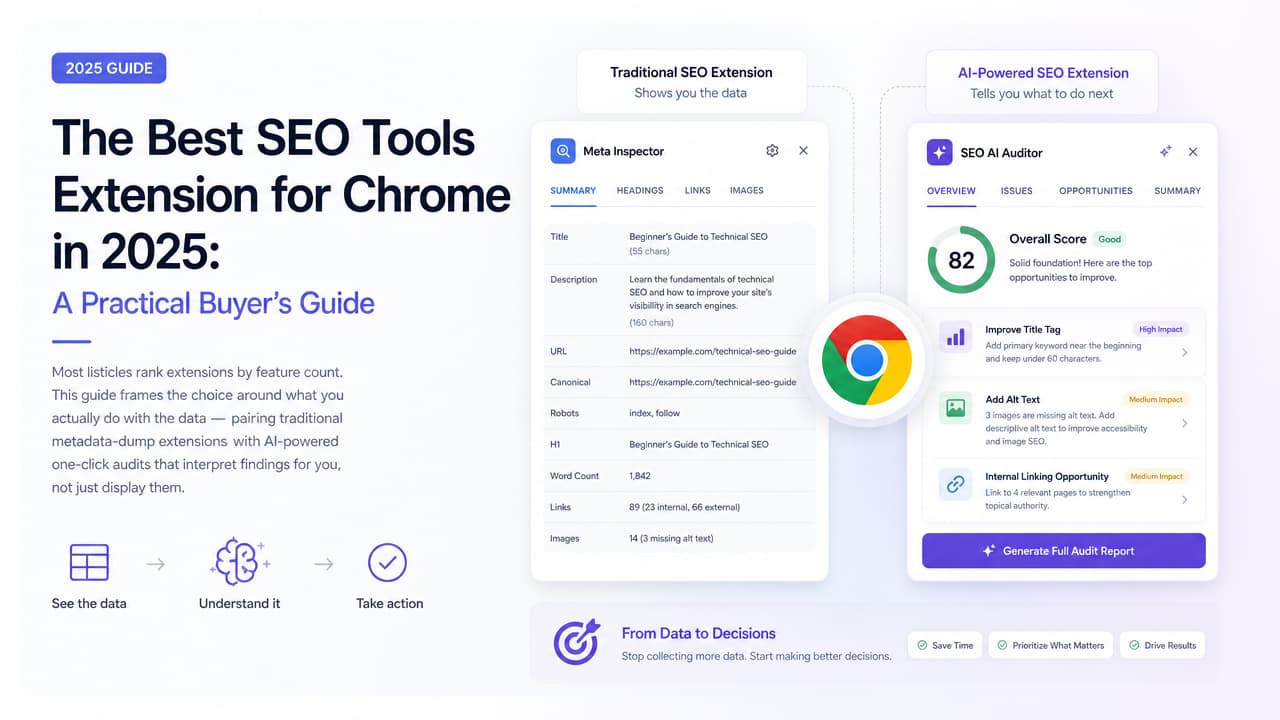
If you want the best SEO tools extension for Chrome, the honest answer is that there isn't one winner — there's a winner for your specific task. Need a fast metadata check? SEO META in 1 CLICK. Want a free all-rounder built for full-time SEOs? Detailed SEO Extension. Want an audit that actually tells you what to fix and why, in one click? That's where an AI-powered tool like Argus by Pixelesq comes in. This guide sorts the options by what you do with the data, not by who has the longest feature list.
The Short Answer: Best Chrome SEO Extensions by Use Case
Most listicles rank extensions by raw feature count. That's the wrong lens. The better question is: what happens after the extension shows you a number? Here's the quick pick, mapped to the job you're trying to do.
| Extension | Best for | Cost | Who it suits |
|---|---|---|---|
| Detailed SEO Extension | Free all-round on-page and metadata checks | Free (450,000+ users) | Full-time SEOs, content strategists |
| SEO META in 1 CLICK | Fast, no-frills metadata inspection | Free | Anyone needing a quick tag check |
| SEOquake | On-page audit plus keyword overlays | Free | SEOs doing site-wide reviews |
| MozBar | Domain and page authority metrics | Freemium | Marketers judging site strength |
| Ahrefs SEO Toolbar | Backlink and link-profile data | Freemium | Competitive and off-page analysis |
| Argus by Pixelesq | AI audits that interpret findings, not just display them | One-click AI insights | Content strategists, marketers, junior devs |
Three broad needs cover most people. If you want a quick check, reach for SEO META in 1 CLICK or Detailed. If you want a deep audit, SEOquake and the Ahrefs/Moz toolbars add depth. And if you want AI insights — plain-language direction on what's wrong and how to fix it — Argus fills the gap the others leave open.
What an SEO Chrome Extension Actually Does
At its core, an SEO Chrome extension pulls the technical signals of any live page and lays them out in one panel, so you don't have to dig through the source code. Click the icon on any URL and a good on-page SEO checker returns the essentials in seconds.
- Title tag — the clickable headline in search results and its length.
- Meta description — the summary snippet and whether it's present.
- Meta robots — whether the page allows indexing and following.
- Canonical tag — which URL the page names as the definitive version.
- Header structure — the H1–H6 outline and whether it's logical.
- Hreflang — language and regional targeting signals.
- Schema markup — structured data that powers rich results.
- Indexability — whether search engines can actually include the page.
That's the shared foundation. Where tools split is what they do with those signals. Lightweight SEO toolbar extensions are built to display data fast and get out of your way. Full audit tools go further, crawling more elements, layering in authority or backlink metrics, and flagging problems. When you check website SEO with either type, you get accuracy — but you still need to know what the numbers mean. That's the decision fork this guide is built around.
Data Display vs. AI Interpretation: The Gap Most Guides Miss
Here's the angle nobody's honest about. Traditional extensions hand you raw data and assume you already speak SEO. SEO META in 1 CLICK will happily tell you the page has no H1. Detailed will show you a canonical pointing somewhere unexpected. Both are excellent at what they do. Neither tells you whether that missing H1 is hurting you, or what to change the canonical to.
For a seasoned SEO, that's fine — the interpretation lives in their head. For a content strategist juggling a dozen pages, a marketing executive who needs a decision, or a junior developer still learning the craft, a wall of tags is a starting point, not an answer.
This is the difference between a data display tool and an AI SEO analysis tool. An AI-powered extension reads the same signals, then interprets them: it explains why a duplicate title matters, ranks issues by impact, and gives you a fix in plain language. Instead of "canonical: /page-a," you get "this page points its canonical at a different URL, so Google may drop it from the index — set the canonical to this page's own URL unless that's intentional."
That's the promise of one-click SEO audit tools with an interpretation layer. You still get the raw tags if you want them, but the tool does the reasoning most people don't have time to do. For teams without a dedicated SEO, that difference is the whole point.
Top Chrome SEO Extensions Compared
Below is the practical breakdown — what each tool is genuinely best at, where it costs money, and where it stops short. For a wider roundup, see our guide to the best Chrome extensions for SEO.
Detailed SEO Extension
Detailed sits at position one in the search results for good reason. It's used by 450,000+ people, it's 100% free, and it was built specifically for full-time SEOs. Click the icon and you get SEO insights on any page in a single tap: title tag, meta description, meta robots, canonical, headings, and more. It also supercharges the right-click menu, so common lookups are a shortcut away.
As a free all-rounder for metadata and on-page checks, it's hard to beat. Its limitation is the same as its strength — it's a display tool. It surfaces the data cleanly and trusts you to interpret it.
SEO META in 1 CLICK
Built by HBI Technology and consistently rated around 4.9, this extension does exactly what its name says: displays all meta data and the main SEO information instantly. It's the fastest way to eyeball a page's tags, headings, and image alt attributes without any setup.
Best for fast, no-frills metadata inspection when you just need to confirm something and move on. It won't run a site-wide audit or interpret results — but for a spot check, that's not what you want anyway.
SEOquake
SEOquake is the versatile veteran. Per AIOSEO, it offers SEO data, site audit information, and keyword research features in one extension, and you can toggle which metrics appear. It's strong for on-page audits paired with keyword overlays directly on the SERP, so you can size up competition while you browse. Our deep dive on the SEOquake Chrome extension covers its setup and limits in detail.
The trade-off is density. SEOquake shows a lot at once, which is powerful for experienced users but can overwhelm beginners who don't know which numbers to prioritize.
MozBar & Ahrefs SEO Toolbar
These two cover the off-page side. MozBar surfaces authority-style metrics — domain and page-level strength — so you can gauge how formidable a site or result is at a glance. The Ahrefs SEO Toolbar leans into backlink and link-profile data, useful for competitive and link analysis while you research.
Both are freemium. The free tiers give you a taste; the genuinely deep backlink and authority data sit behind paid Moz or Ahrefs subscriptions. Best for competitive analysis rather than day-to-day on-page fixes.
Argus by Pixelesq: AI-Powered One-Click Audits
Argus is the interpretation layer the other tools leave out. It runs a one-click AI SEO audit that reads the same on-page and technical signals — titles, metas, canonicals, headings, indexability, schema — and then explains what each finding means, flags what's actually a problem, and prioritizes the fixes.
That makes it the natural companion for marketers who need actionable direction over raw tags, and for junior developers who want to learn why a fix matters, not just that something is red. As the all-seeing SEO inspector, Argus turns AI-powered SEO insights into a to-do list instead of a data dump. Pair it with a display tool like Detailed and you cover both ends: raw signals when you want them, plain-English guidance when you need it.
Free vs. Paid: What You Really Need
Good news for tight budgets: most core Chrome SEO extensions are free. Detailed, SEO META in 1 CLICK, and SEOquake all offer their central on-page functionality at no cost, and that's enough for the vast majority of everyday checks. If your job is verifying metadata, spotting a missing H1, or confirming a page is indexable, a free SEO audit tool handles it comfortably. There's a whole list of free SEO audit tools worth knowing about.
Paid tiers earn their keep in three areas:
- Backlink data — full link profiles and referring domains, mostly via Ahrefs and Moz subscriptions.
- Historical tracking — how rankings, metrics, and issues change over time.
- Bulk audits — scanning many pages or a whole site at once instead of URL by URL.
A simple rule: stay free while you're checking individual pages and interpreting on-page signals. Consider upgrading when you need competitive backlink intelligence, trend data for reporting, or site-wide audits at scale. Until then, a free seo tools extension for chrome paired with an AI interpretation layer covers most real work.
How to Choose Based on Your Role
The right stack depends on what you're accountable for. Here's how the compared tools map to three common roles.
Content strategist
You care about on-page quality across many pages — titles, descriptions, headings, and whether content is actually indexable. Use Detailed or SEO META in 1 CLICK for fast metadata checks, then layer Argus on top so the AI interprets findings and tells you which pages need attention first. That combination keeps you moving without needing a technical SEO on call. If you're new to it, our step-by-step guide to website SEO is a good grounding.
Marketing executive
You need quick insights and something you can act on or report, not a spreadsheet of tags. An AI-powered SEO toolbar for marketers like Argus gives you prioritized issues and plain-language explanations you can turn into decisions and ROI conversations. MozBar is a useful add-on when you want a fast read on a competitor's authority.
Junior developer
You're learning, and the why matters as much as the what. AI explanations turn every audit into a lesson: Argus tells you what a bad canonical or a noindex tag does and how to correct it. Keep Detailed installed too, so you can see the raw signals behind the AI's advice and build your own instincts over time.
How to Run Your First One-Click SEO Audit
Running a quick SEO site check takes about a minute once the extension is installed. Here's the workflow. For a fuller walkthrough, see our SEO audit tutorial.
- Install from the Chrome Web Store. Search for the extension, add it to Chrome, and pin the icon to your toolbar for easy access.
- Navigate to the page you want to audit. Any live URL works — your own page or a competitor's.
- Click the extension icon. A panel opens with the page's SEO signals. With an AI tool, it also runs the interpretation.
- Read the report. Scan the metadata and, if you're using Argus, the AI's plain-language notes on what's healthy and what's flagged.
- Prioritize fixes. Start with anything that blocks indexing, then move to titles, descriptions, and headings.
Here's what good versus flagged results look like so you know what you're reading:
- Title tag — Good: one clear, unique title roughly 50–60 characters. Flagged: missing, duplicated, or truncated.
- Meta description — Good: present and descriptive, around 150–160 characters. Flagged: missing or duplicated across pages.
- Headings — Good: exactly one H1 with a logical H2/H3 structure. Flagged: no H1 or multiple competing H1s.
- Canonical — Good: points to the correct, intended URL. Flagged: points to an unrelated page or is missing where needed.
- Indexability — Good: the page is indexable and follow. Flagged: a noindex tag or robots block on a page you want ranked.
The display tools stop at showing you these states. An AI-powered one-click SEO audit goes the extra step and tells you which flag to fix first — which is exactly what turns a report into progress. If you want the underlying reference, our complete list of on-page SEO tags explains each one with examples.
Frequently Asked Questions
What is the best SEO extension for Chrome?
There's no single best — it depends on the task. Detailed SEO Extension is the strongest free all-rounder for on-page and metadata checks. SEO META in 1 CLICK is best for fast tag inspection. For audits that interpret findings and tell you what to fix, an AI-powered tool like Argus by Pixelesq fills the gap the others leave open. Our roundup of the best SEO extensions for Google Chrome compares them by job-to-be-done.
Is there a detailed SEO extension for Chrome?
Yes — literally. Detailed SEO Extension is a free tool used by 450,000+ people that surfaces title tags, meta descriptions, robots directives, canonicals, and more in one click. It also enhances the right-click menu for quick lookups. It's built for full-time SEOs but works well for anyone doing on-page checks.
Does Google have a free SEO tool?
Google doesn't offer a browser extension, but it provides free SEO tools like Search Console (for indexing, performance, and coverage data) and the Rich Results Test for structured data. For live, on-page inspection while browsing, a Chrome extension is faster — and most of the core ones are free.
What are the 5 best SEO tools?
For Chrome extensions specifically, a strong shortlist is: Detailed SEO Extension (free all-rounder), SEO META in 1 CLICK (fast metadata), SEOquake (audit plus keyword overlays), the Ahrefs SEO Toolbar or MozBar (backlink and authority data), and Argus by Pixelesq (AI-powered interpretation and one-click audits).
Are free SEO Chrome extensions good enough for a full audit?
For page-level on-page checks, yes — free extensions cover titles, metas, headings, canonicals, and indexability well. Where free tools fall short is deep backlink data, historical tracking, and bulk site-wide audits, which sit in paid tiers. Pairing a free display extension with an AI interpretation layer like Argus gets most teams a long way before any upgrade is needed.

