How to Do SEO for Your Website in 7 Steps
Learning how to website SEO comes down to a repeatable loop: diagnose your site first, then fix what actually moves rankings. You don't need to be an expert or hire an agency. Beginners can do SEO themselves on WordPress, Wix, Webflow, Squarespace, or any CMS using free tools and a clear process.
Here are the seven core steps we'll walk through:
- Audit your current site to see where you stand.
- Do keyword research to find what your audience actually searches.
- Optimize on-page elements like titles, URLs, and headings.
- Cover technical SEO basics so Google can crawl and index you.
- Publish relevant, authoritative content that answers real questions.
- Build authority and backlinks from reputable sites.
- Measure, track, and iterate with analytics and re-audits.
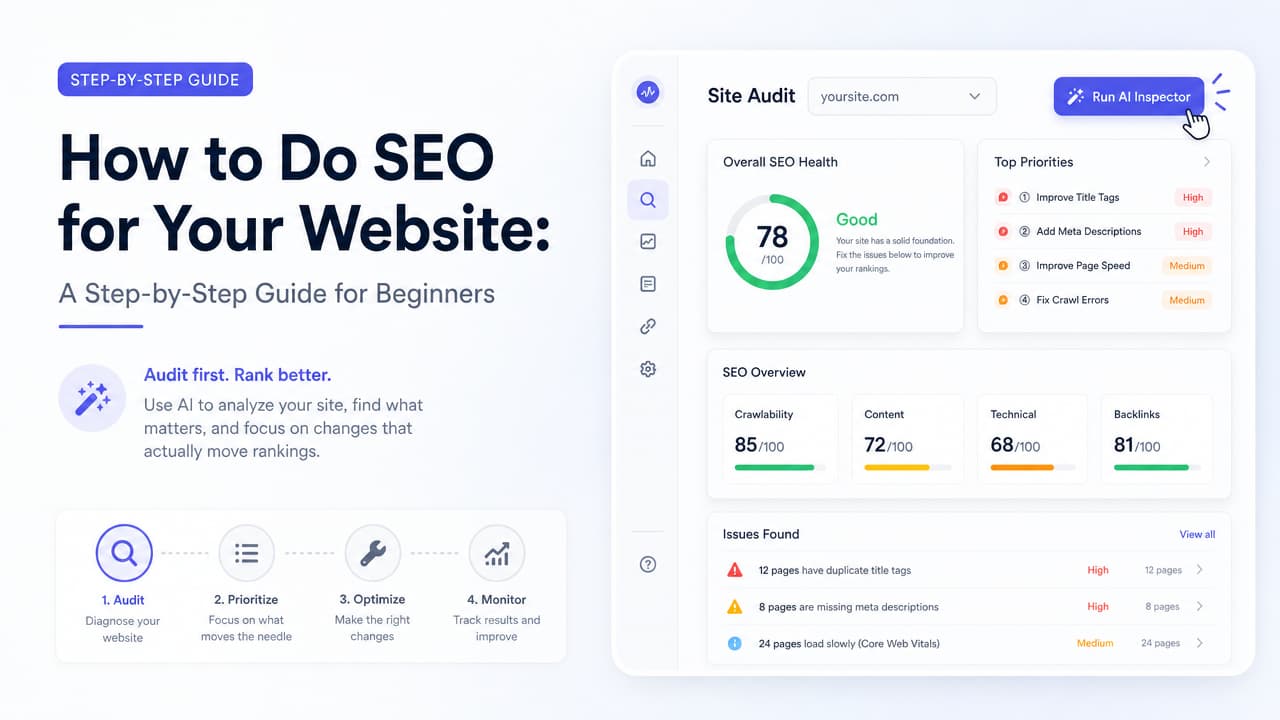
The single fastest way to know where to start is a one-click audit. Argus, the AI-powered SEO Chrome extension, inspects any page and surfaces issues in seconds—no technical background required. Run it on your homepage before you change a thing, and you'll know exactly which of these seven steps deserves your attention first.
Step 1: Audit Your Site Before You Change Anything
Most SEO guides hand you a checklist and tell you to start editing. That's backwards. Google's Starter Guide, MTU's ranking tips, and Bruce Clay's how-to all describe what good SEO looks like—but they skip the part where you figure out what your specific site is missing. If you optimize blindly, you waste effort on things that were already fine.
An SEO audit answers one question: where is my site losing points right now? A thorough audit checks for:
- Title and meta description issues — missing, duplicated, too long, or not compelling.
- Heading structure problems — no H1, skipped levels, or multiple H1s competing.
- Broken links — internal or external links pointing to dead pages.
- Slow-loading pages — heavy images and scripts that frustrate visitors.
- Crawlability and indexing problems — pages search engines can't reach or read.
The beginner-friendly way to audit
Manual audits require you to view page source, cross-check tags, and interpret technical reports. That's a barrier for content strategists and marketers who aren't developers. This is where a one-click AI audit changes the game. If you want the full walkthrough, this step-by-step SEO audit tutorial covers technical, on-page, and off-page health in one sitting.
Open the page you want to check, click Argus, and the extension delivers plain-language insights on your title tags, meta descriptions, headings, links, and more. Instead of raw data you have to decode, you get a prioritized read on your website's SEO score and what to fix. It's the difference between guessing and knowing—and it means a junior developer or a first-time site owner can diagnose problems that used to require a specialist. You can also run an on-page SEO audit with a simple 8-step checklist to keep the process repeatable.
Do this before every other step. Your audit becomes the map for the rest of this guide.
Step 2: Do Keyword Research
Keywords are the phrases people type into search. Keyword research is simply finding the terms your audience uses, then matching your pages to them. Get this right and every other step compounds; get it wrong and you'll rank for words nobody searches.
Match search intent
Before chasing a keyword, ask what a searcher actually wants. Someone typing "best running shoes" is comparing options; someone typing "how to clean running shoes" wants a tutorial. Your page has to satisfy the intent behind the query, not just contain the words. Look at what already ranks on page one—that's Google telling you what intent it rewards.
Prioritize long-tail keywords
Short, broad terms like "marketing" are brutally competitive. Long-tail keywords—longer, more specific phrases like "email marketing tips for small businesses"—have lower competition and clearer intent. They convert better and are far more realistic to rank for when you're starting out.
Where to find keywords for free
- Google's own autocomplete and "People also ask" boxes.
- The "Related searches" at the bottom of the results page.
- Free tools like Google Search Console (once your site is verified) to see terms you already appear for.
Map keywords to pages
Assign one primary keyword to each page so they don't compete with each other. On-page SEO includes targeting the right keywords within your content, and there's a right way to place on-page SEO keywords for rankings and AI search. If you want to speed up ideation, compare these AI-powered keyword research tools to cluster terms by intent.
Step 3: Optimize On-Page Elements
On-page SEO is everything you control directly on a page. These edits are the highest-leverage work most beginners can do, and your Step 1 audit already told you which ones need attention. For a deeper reference, this complete list of on-page SEO activities maps each item to a fix you can verify in seconds.
Use descriptive URLs
Google's Starter Guide is explicit: use descriptive URLs and organize your site logically. A URL like /blog/seo-audit-guide tells both users and search engines what the page covers—far better than /p?id=8842.
Write strong title tags and meta descriptions
The title tag is the clickable headline in search results and one of the most important on-page signals. Include your primary keyword naturally near the front. For meta descriptions, keep them concise and compelling—about 8–12 words is plenty for shorter titles and image alt text, per Webnode's DIY guidance. Use a keyword if it fits naturally, but never cram them in.
Structure headings properly
Every page should have one clear H1, with H2s and H3s organizing subtopics underneath. This hierarchy helps readers scan and helps search engines understand your content's structure.
Add internal links
Link related pages to each other. Internal linking spreads authority across your site and helps visitors (and crawlers) discover more of your content. Group topically similar pages in directories, as Google recommends, to reinforce those relationships.
Optimize image alt text
Alt text describes an image for screen readers and search engines. Be descriptive but skip filler phrases like "image of" or "picture of"—the context is already implied. Good alt text improves accessibility and gives you a shot at ranking in image search.
Reduce duplicate content
Duplicate content confuses search engines about which page to rank. Consolidate near-identical pages and make sure each URL serves a distinct purpose.
After you make these edits, re-run Argus on the page. You'll see whether your titles, headings, and links now pass—closing the audit-improve loop in real time. Want a tighter routine? These one-page SEO tips walk you through a single URL in about 15 minutes.
Step 4: Cover Technical SEO Basics
Technical SEO sounds intimidating, but the beginner essentials are approachable even if you've never touched code. The goal is simple: make it easy for search engines to find, crawl, and index your pages.
- Create a sitemap. A sitemap lists your pages so search engines can find them all. On WordPress, plugins like Yoast or RankMath generate one automatically. Most modern platforms create one for you too.
- Submit to Google Search Console. This free tool verifies your site, lets you submit your sitemap, and reports indexing issues, mobile problems, and the queries you rank for. It's non-negotiable for any serious SEO effort.
- Ensure mobile-friendliness. Google indexes the mobile version of your site first. Test on a phone and confirm text is readable and buttons are tappable without zooming.
- Improve page speed. Compress images, limit heavy scripts, and enable caching. Faster pages rank better and keep visitors from bouncing.
- Use HTTPS. A secure certificate is a trust and ranking signal. Most hosts offer one free.
- Fix crawl and indexing issues. Search Console flags pages that can't be indexed. Your Argus audit can surface crawlability red flags on individual pages before they pile up.
None of these require a developer background. A junior developer can knock them out in an afternoon, and a non-technical marketer can follow each platform's built-in settings.
Step 5: Publish Relevant, Authoritative Content
Technical fixes get you in the game; content is how you win it. MTU's ranking advice puts it plainly—publish relevant, authoritative content and update it regularly. Search engines reward pages that genuinely answer what people are looking for.
Demonstrate E-E-A-T
Google evaluates content for Experience, Expertise, Authoritativeness, and Trustworthiness. Show real experience with your topic, cite credible sources, add author information, and keep facts accurate. This matters most for topics that affect health, finance, or safety, but it lifts every page.
Answer real user questions
Structure content around the questions your audience actually asks—pull them from the "People also ask" boxes and your keyword research. Clear, direct answers near the top of a page perform well and are exactly what AI Overviews and generative search pull from.
Write for AI-powered search
Search results increasingly include AI Overviews that summarize answers directly. These systems favor comprehensive, well-structured content with clear headings, concise answers, and logical organization. The same practices that help human readers—short paragraphs, descriptive subheadings, direct answers—also make your content easy for AI to surface.
Update existing content
Content decays. Refresh statistics, update examples, and expand thin pages on a regular schedule. Updating a strong page you already have is often faster than writing a new one and can recover lost rankings.
Step 6: Build Authority and Backlinks
Off-page SEO is everything that happens beyond your own site to build its reputation. The core currency is backlinks—links from other websites pointing to yours. Each quality link acts like a vote of confidence that raises your domain authority.
For beginners, quality beats quantity every time. One link from a respected, relevant site outweighs dozens from spammy directories. Focus your energy here:
- Earn editorial links by publishing genuinely useful content people want to reference.
- Guest content — contribute articles to reputable sites in your niche with a natural link back.
- Digital PR — share original data, tools, or stories that journalists and bloggers want to cover.
- Local citations — for local businesses, get listed in accurate, consistent directories and Google Business Profile.
Avoid buying links or joining link schemes. They violate Google's guidelines and can get your site penalized. Slow, honest authority-building is what lasts.
Step 7: Measure, Track, and Iterate
SEO isn't a one-time project—it's a loop. You can't improve what you don't measure, so set up tracking before you expect results.
- Google Analytics shows how much organic traffic you get, which pages perform, and what visitors do once they arrive.
- Google Search Console reveals which queries you rank for, your click-through rates, and technical issues as they appear.
Watch your organic traffic and keyword rankings over time, not day to day. SEO builds gradually, and short-term fluctuations are normal.
Re-audit on a schedule
Sites change—new pages ship, content ages, links break. Re-audit periodically to catch regressions. A quick Argus check on your key pages each month keeps the audit-improve-remeasure loop turning without a big time investment. Running through an on-page SEO one-click audit checklist makes these recurring reviews fast. When the extension flags a new issue, you fix it and move on. That steady rhythm is what separates sites that climb from sites that plateau.
Can a Beginner Do SEO for Free?
Yes. Beginners can absolutely do SEO themselves for free. The most valuable tools in this entire guide cost nothing, and Google publishes its own guidance for anyone who wants to learn.
Here's a free-first workflow that covers the essentials:
- Google Search Console — free indexing, query data, and technical alerts.
- Google Analytics — free traffic and behavior tracking.
- Google's SEO Starter Guide — the source of truth on how search works.
- A browser extension like Argus — one-click, AI-powered audits that translate technical findings into plain insights, right in your Chrome browser.
- Free keyword sources — autocomplete, "People also ask," and related searches.
You don't need a technical degree to start. Nina the junior developer and Tom the marketing executive can both run a page audit, read the recommendations, and act on them today. It helps to compare the best SEO extensions for Google Chrome so you pick the right free or AI-powered tool for your workflow. Paid tools add value later—deeper backlink databases, large-scale rank tracking, and competitive research—but they're accelerators, not prerequisites. Start free, build the habit, and upgrade only when your growth justifies it.
Frequently Asked Questions
How do I SEO my own website?
Start by auditing your site to find what's broken or missing, then work through the seven steps: keyword research, on-page optimization, technical basics, quality content, link building, and ongoing measurement. Run a one-click audit with Argus first so you know which fixes matter most for your specific pages.
How do I set up SEO for my website?
Set up the foundations: verify your site in Google Search Console, submit a sitemap, confirm your site loads on mobile and uses HTTPS, and assign a target keyword to each page. From there, optimize titles, headings, and URLs, then publish content that answers your audience's questions.
Can a beginner do SEO?
Yes. SEO is beginner-friendly, especially with free tools and AI-powered extensions that explain issues in plain language. You'll learn fastest by auditing your own site, making one improvement at a time, and watching how rankings respond in Search Console.
How do I add SEO to my website pages?
Add SEO page by page: write a descriptive title tag and meta description, use a single clear H1 with logical subheadings, include your target keyword naturally, add internal links to related pages, and write descriptive alt text for images. On WordPress, plugins like Yoast or RankMath give you fields for these directly in the editor.
How long does SEO take to show results?
SEO is a long game. Early technical and on-page fixes can show movement within weeks, but meaningful gains in rankings and organic traffic typically take a few months of consistent work. Keep publishing, keep earning links, and re-audit regularly—the compounding shows up over time.

